01The idea
Every Sapplify app is one I went looking for and couldn’t find. In 2024 I was using a list app that sold my groceries to an ad network, a weight app with notifications I couldn’t switch off, and a budgeting app that wanted my bank login. Simple software for simple jobs, eaten by business models.
So I started rewriting them, one at a time, building the least that still did the job. Building one app is a project; building many is a production problem. That’s what turned a set of apps into a studio.
- One job, done properly. Focused apps with craft, instead of broad apps that do many things half-well.
- Your data is yours. On-device first, offline by default, and every app exports to CSV or JSON for free.
- No dark patterns. No ads, no manipulative trials, no notifications you didn’t ask for.
- Pay once. Or don’t. A real free tier in every app, and a one-time unlock instead of subscriptions.
02The system
The core of Sapplify isn’t a single app, it’s the machine behind them. Here is how it fits together.
The whole studio
Everything below runs the studio: one person, ten products, one shared spine. Scroll to walk through it piece by piece.
Release path
One control plane. A command line tool on my Mac runs every release: it loads keys from the secrets vault, ships iOS straight to App Store Connect through its API, and hands Android builds to a dedicated build machine that uploads to Google Play and Huawei AppGallery.
Why: Three stores, one process. A release is a command, not an afternoon.
Product portfolio
Eight Flutter apps share one package pattern, so every app starts from the same architecture and building blocks. HIGHWAY, an endless driving game, is built in Godot. EUInvoice is deliberately separate: its own brand, its own database and its own release path.
Why: Shared where it saves time, separate where the brand or the risk is different.
Shared data spine
One Supabase project backs every surface that reads or writes studio data: each app’s data, the studio’s operations and the analytics. The backend, the websites, the account portal and the HQ dashboard all work from the same source.
Why: One source of truth, so HQ can show everything without syncing anything.
Growth loop
Renderers produce store screenshots and marketing assets and push them to the CDN. Automated jobs handle SEO, reviews and social, and the results flow back as analytics into the shared database.
Why: Growth work that repeats is automated, so attention goes to what doesn’t.
Money
One Stripe account bills every brand under the same legal entity. A webhook turns payments into entitlements in the shared database, while in-app purchases run natively through the stores.
Why: One place for revenue, one place for access.
Unattended ops
Every night, studio agents run releases, tests, SEO and social without anyone in the loop. Sapplify HQ is the one dashboard over all of it.
Why: The studio keeps shipping while I sleep. My job is the decisions, not the chores.
03Sapplify HQ
HQ is where the studio reports back to me. Every morning it shows what the automated jobs did, what broke, and what actually needs a human. Everything else runs without me.
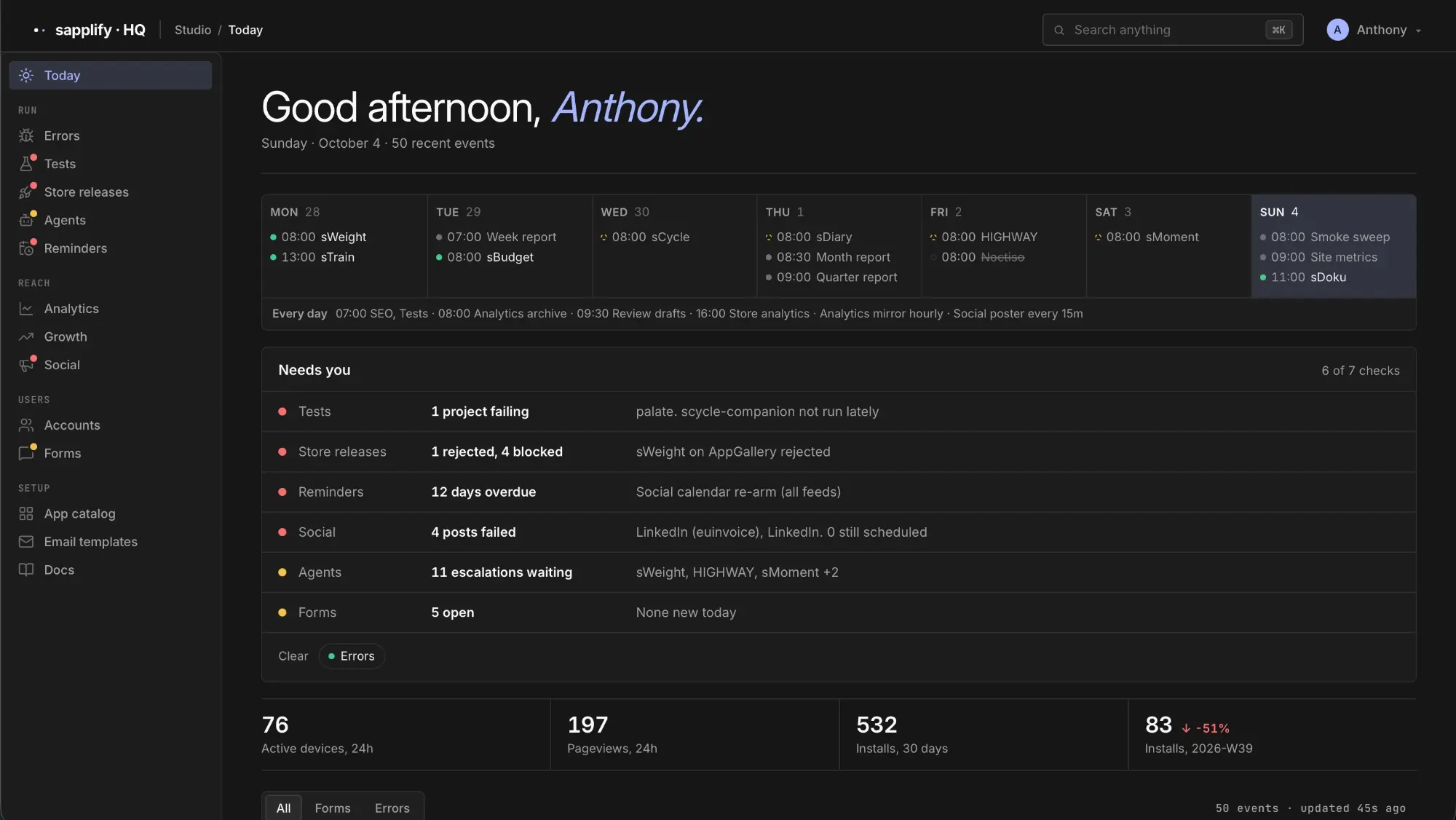
- The week at a glance. Scheduled releases, reports and checks per app, plus the jobs that run every day: SEO, tests, store analytics, an hourly analytics mirror and a social poster every 15 minutes.
- Needs you. Seven automated checks boil down to the few things that need a decision, like a store rejection or posts that failed.
- The numbers that matter. Active devices, pageviews and installs, with the trend against last week.
04The portfolio
Eight apps live on the App Store and Google Play, most of them on Huawei AppGallery too, plus a game and a separate SaaS. All running on the same studio.
-
 sLists
Plain lists. Nothing more.
App StoreGoogle PlayAppGallery
sLists
Plain lists. Nothing more.
App StoreGoogle PlayAppGallery
-
 sMoment
Breathe on purpose. Thirty seconds at a time.
App StoreGoogle Play
sMoment
Breathe on purpose. Thirty seconds at a time.
App StoreGoogle Play
-
 sBudget
A budget that stays simple.
App StoreGoogle PlayAppGallery
sBudget
A budget that stays simple.
App StoreGoogle PlayAppGallery
-
 sWeight
Weight, without the noise.
App StoreGoogle PlayAppGallery
sWeight
Weight, without the noise.
App StoreGoogle PlayAppGallery
-
 sCycle
A period tracker with a companion.
App StoreGoogle PlayAppGallery
sCycle
A period tracker with a companion.
App StoreGoogle PlayAppGallery
-
 sTrain
A notebook for workouts.
App StoreGoogle Play
sTrain
A notebook for workouts.
App StoreGoogle Play
-
 sDiary
A book of your days.
App StoreGoogle Play
sDiary
A book of your days.
App StoreGoogle Play
-
 sDoku
The puzzle page, printed properly.
App StoreGoogle Play
sDoku
The puzzle page, printed properly.
App StoreGoogle Play
-
 HIGHWAY
Five lanes. One car. No finish line.
App Store
HIGHWAY
Five lanes. One car. No finish line.
App Store
- EUInvoice Invoicing SaaS, deliberately its own brand.
05Key decisions
One shared spine
One database, one payment account and one secrets vault for the whole studio. Every new app plugs into what already exists instead of starting from zero.
Separate when it matters
EUInvoice handles business data for paying customers, so it gets its own brand, database and release path. Shared infrastructure is a default, not a rule.
Automate the repeatable
Releases, tests, store assets, SEO and social run on their own every night. Anything I would do the same way twice becomes a job for the machine.
One place to see it all
Sapplify HQ sits on top of the shared database, so the state of every product, release and metric is one dashboard away.
06Spotlight: sCycle
A period tracker with a companion. The studio’s most downloaded app, with 2,800+ downloads.
Period trackers tend to be either clinical or loud. In September 2026 I rebuilt sCycle around a companion instead: you pick Mo the otter or Juno the fox, give them a name, and they keep you company through the month. Every day starts with your cycle day, your phase, your next period, and a line from your companion that fits the day.
Mo through the four phases, with one of his lines for each. Every companion has its own pose per phase, modelled and rendered in Blender as a short loop, in a light and a dark version.
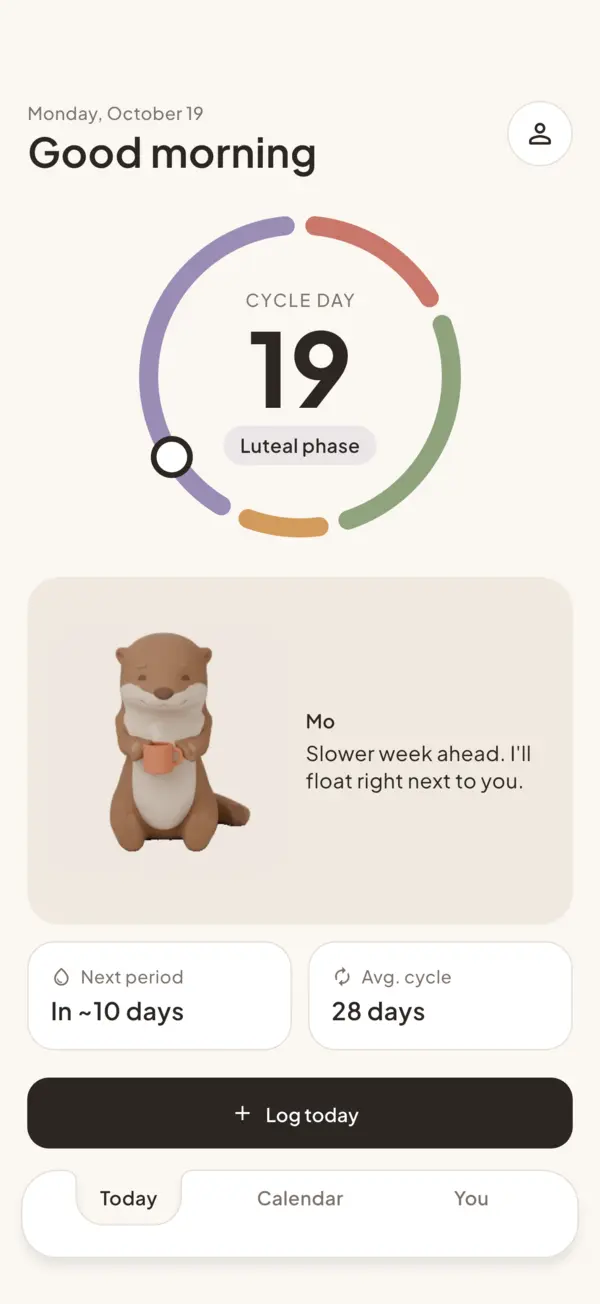
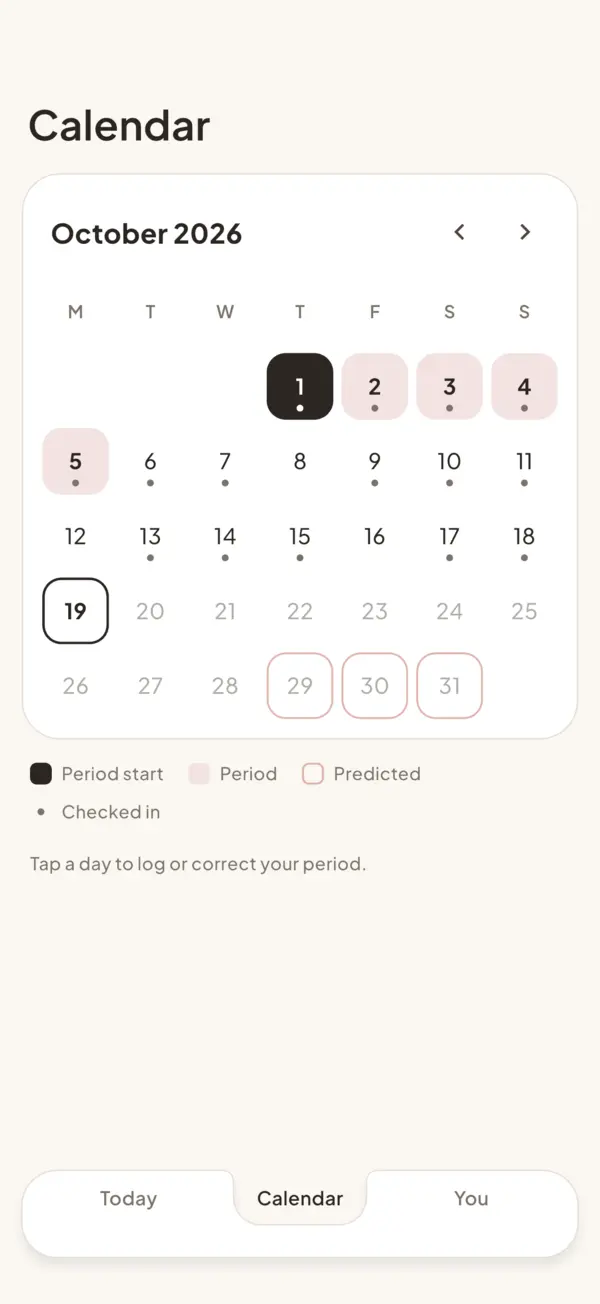
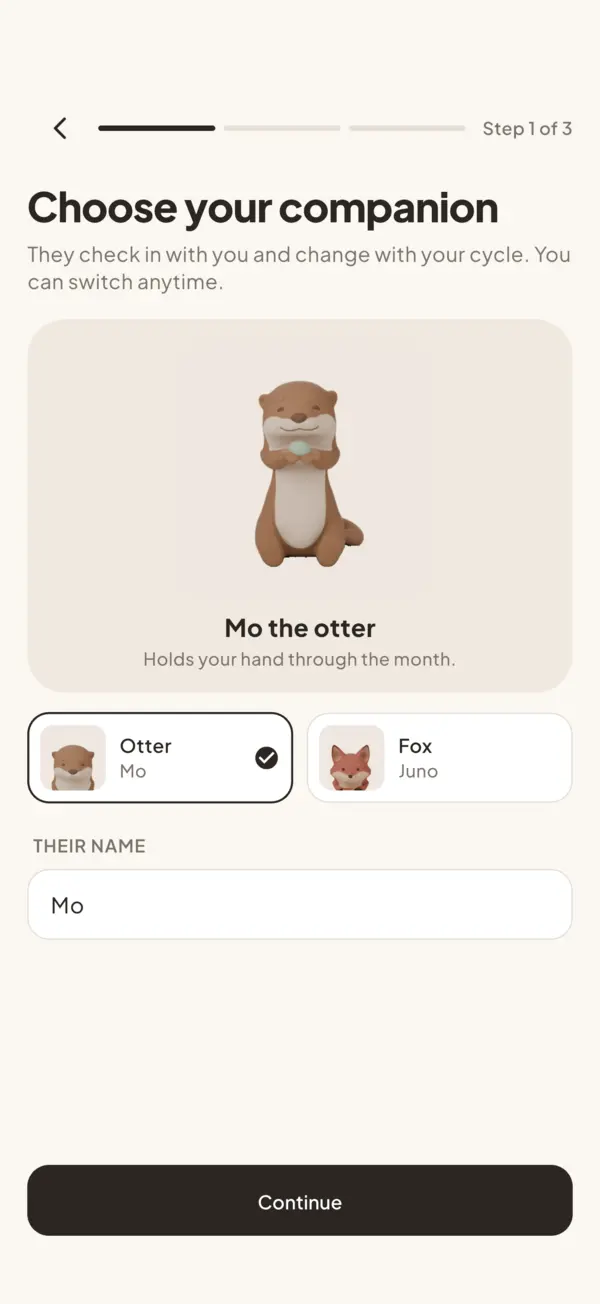
Two companions, two voices
Mo is gentle and reassuring, Juno is curious, pattern-minded and a little drier. Both follow the same rules in all 23 languages: grown-up, brief, never baby talk, never scolding, no exclamation marks.
A companion that remembers
Logged cramps or a low mood around this day last cycle? Your companion brings it up a little early, with something that tends to help. When a new cycle starts, you get a short summary of the last one.
Blender for the character, Flutter for the details
The loops stay small because the app draws everything that moves on top of them, like the steam rising from Mo’s mug. A still poster shows first, the loop never pauses your music, and a loop that fails to load never breaks the screen.
A median, not a mean
Predictions come from your own recent cycles, using the median gap. One month you forgot to log shows up as a single long gap and must not move the next prediction.
A rebuild nobody has to notice
On first launch the new app quietly moves everything from the old app’s encrypted database in one transaction, retries on the next launch if anything fails, and keeps the sync IDs so Sync carries on where it left off. Pro carries over too.
The rest of the studio’s principles stay: tracking is free, Pro is a one-time unlock for every companion, the cycle stays on the phone without an account, and Sync is optional.
07Results
08What I learned
Building a product is not the hardest part. Getting users, and making the product valuable enough that they want to pay for it, is. Sapplify taught me the whole path: from building to a product, and from a product to maintaining many of them efficiently.
Along the way I went deep on the store APIs of Apple, Google and Huawei, which is what made one release path for three stores possible. And I learned to work with KPIs properly: what to collect, how to collect it, what the numbers actually mean, and how to act on them.